Translate Content

Joomla Search

Pro Templates

Don't pay a fortune for a professional Joomla template.

  • Eye catching designs...look professional
  • XHTML valid...better by design
  • CSS Driven...faster and lightweight
  • SEO ready...get traffic

Get a solid foundation for your Joomla website

Free Templates

Browse the biggest choice of free Joomla templates around!

  • Quality design
  • Free customization forum
  • Continuously updated
  • Same Joomlashack quality

Download your free Joomla Template now

The Joomla 1.5 Book

Get the have-to-have book about Joomla 1.5 from Amazon.com. and get free access to the companion site, joomlabook.com.

We Recommend

JomSocial
How to Remove 'Welcome to the Frontpage'
Written by TJ Baker   
Last Updated ( Friday, 08 February 2008 06:41 )

One question we get quite a bit in the Community Forum is "how do I remove or change the 'Welcome to the Frontpage' message in Joomla 1.5". 

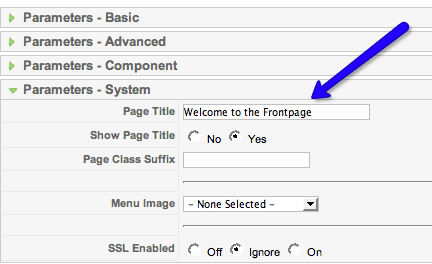
With Joomla 1.5 we have the ability to set a page title for each 'page'.  The title can be set in the parameters of the menu item (link) for the particular page in question.  So, for example, to change the page title or shut it off for the Home page do the following:

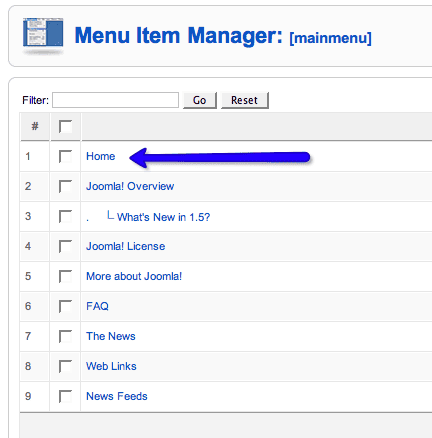
Log in to your Joomla Admin and go to the menu that contains the item you would like to change (the 'Home' item in our case, which is in the Main Menu):


Once you are in the Home item, look to the right and  you will see the Parameters tabs.  Click on the 'Parameters - System' tab and set your Page Title here.. or set it to 'off'.  
You can use this technique to set Page Titles for all of your 'pages'.


blog comments powered by Disqus
 

Advertise Here

Joomlashack designs free and commercial Joomla Templates
Learn how to Joomla with our Joomla Training or join our lifetime Joomla Template Club

Copyright 2005-2009 Joomlashack. All rights reserved unless otherwise stated.
The Joomla! name is used under license from Open Source Matters.