
Documentation for Joomla 6
OSMap includes an Increase Memory option that helps prevent sitemap generation problems on websites with low PHP memory limits.
This setting is especially useful for large websites with many menu items, articles, categories, tags, or third-party integrations.
Where to Find the Setting
- In the Joomla administrator area, go to Components > OSMap > Options:

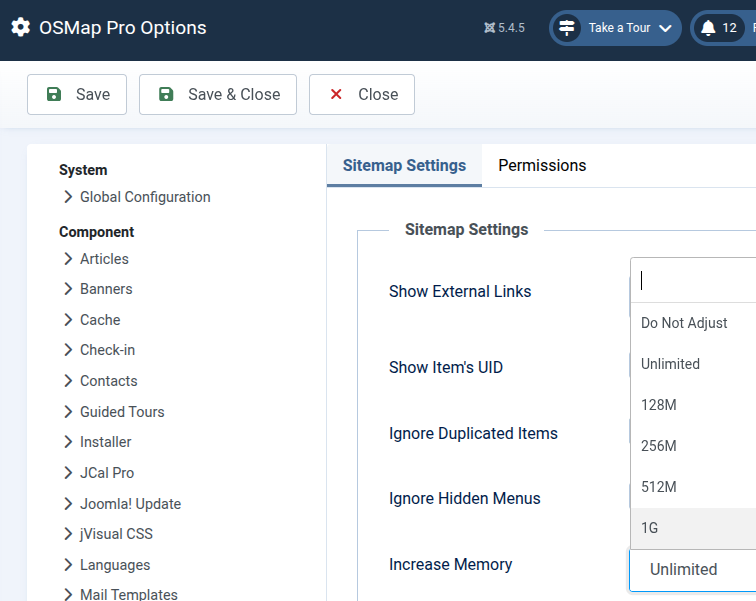
- Then locate the Increase Memory setting under the Sitemap Settings tab:
Available Options
The Increase Memory dropdown includes the following options:
- Do Not Adjust
- 128M
- 256M
- 512M
- 1G
- Unlimited
What This Setting Does
When OSMap generates a sitemap, it may temporarily increase PHP’s memory_limit value during the request.
This can help avoid memory exhaustion errors on websites with:
- very large sitemaps
- many extensions/plugins
- complex menu structures
- shared hosting environments with low PHP memory limits
For example, if your server memory limit is 128M and you select 256M, OSMap will attempt to raise the limit to 256M while generating the sitemap.
Recommended Setting
For most websites, we recommend:
- Do Not Adjust — if your hosting already provides sufficient memory
- 256M — for medium-to-large websites
- 512M or higher — only for unusually large sitemap builds
Important Notes
The Unlimited option sets PHP’s memory limit to -1.
This removes the PHP memory cap for the sitemap generation process.
While this may help on some servers, it is generally recommended only for advanced environments such as VPS or dedicated servers.
On shared hosting environments, using a defined limit such as 256M or 512M is usually safer.
Hosting Restrictions
Some hosting providers prevent PHP scripts from changing the memory limit dynamically.
If your hosting blocks memory changes, OSMap will continue using the server’s existing PHP memory limit.
Troubleshooting
If you encounter memory-related errors while generating sitemaps:
- Increase the setting to 256M
- Clear Joomla and browser cache
- Regenerate the sitemap
- If the issue continues, try 512M
If problems persist, contact your hosting provider to verify your server’s PHP memory configuration.
Documentation for Joomla 3
OSMap includes an Increase Memory option that helps prevent sitemap generation problems on websites with low PHP memory limits.
This setting is especially useful for large websites with many menu items, articles, categories, tags, or third-party integrations.
Where to Find the Setting
- In the Joomla administrator area, go to Components > OSMap > Options:

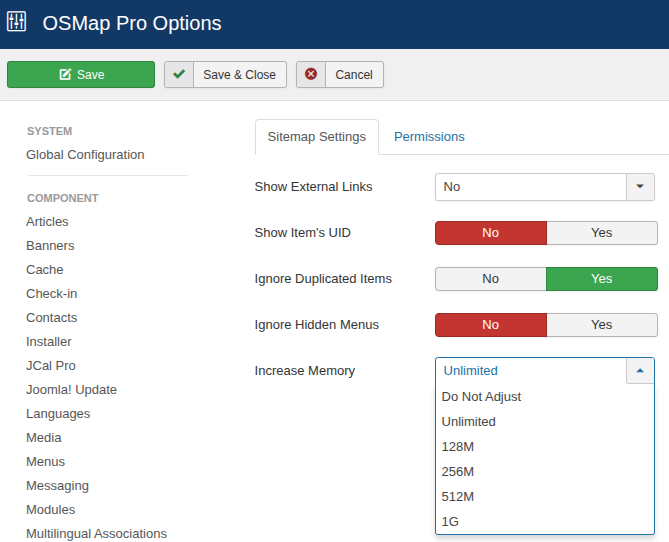
- Then locate the Increase Memory setting under the Sitemap Settings tab.
Available Options
The Increase Memory dropdown includes the following options:
- Do Not Adjust
- 128M
- 256M
- 512M
- 1G
- Unlimited
What This Setting Does
When OSMap generates a sitemap, it may temporarily increase PHP’s memory_limit value during the request.
This can help avoid memory exhaustion errors on websites with:
- very large sitemaps
- many extensions/plugins
- complex menu structures
- shared hosting environments with low PHP memory limits
For example, if your server memory limit is 128M and you select 256M, OSMap will attempt to raise the limit to 256M while generating the sitemap.
Recommended Setting
For most websites, we recommend:
- Do Not Adjust — if your hosting already provides sufficient memory
- 256M — for medium-to-large websites
- 512M or higher — only for unusually large sitemap builds
Important Notes
The Unlimited option sets PHP’s memory limit to -1.
This removes the PHP memory cap for the sitemap generation process.
While this may help on some servers, it is generally recommended only for advanced environments such as VPS or dedicated servers.
On shared hosting environments, using a defined limit such as 256M or 512M is usually safer.
Hosting Restrictions
Some hosting providers prevent PHP scripts from changing the memory limit dynamically.
If your hosting blocks memory changes, OSMap will continue using the server’s existing PHP memory limit.
Troubleshooting
If you encounter memory-related errors while generating sitemaps:
- Increase the setting to 256M
- Clear Joomla and browser cache
- Regenerate the sitemap
- If the issue continues, try 512M
If problems persist, contact your hosting provider to verify your server’s PHP memory configuration.