
OSMap uses Joomla's Robots settings to determine whether a page should be included in an XML sitemap.
This tutorial explains where these settings are located and the order in which OSMap checks them.
Before You Begin
OSMap treats XML and HTML sitemaps differently.
- XML sitemap: Respects Joomla Robots settings.
- HTML sitemap: Does not use the Robots checks described in this tutorial.
As a result, a page can be excluded from the XML sitemap but still appear in the HTML sitemap.
Step 1. Check the Article Robots Setting
If the URL belongs to a Joomla article, OSMap checks the article's Robots setting first.
To find this setting:
- Go to Content > Articles.
- Open the article.
- Select the Publishing tab.
- Locate the Robots option.
This is the highest-priority setting for Joomla articles.
Step 2. Check the Menu Item Robots Setting
If the article does not define a Robots value, OSMap checks the menu item that links to the page.
To find this setting:
- Go to Menus.
- Open the menu that contains the menu item.
- Select the menu item.
- Open the Metadata tab.
- Locate the Robots option.
Step 3. Check the Global Robots Setting
If neither the article nor the menu item defines a Robots value, OSMap uses Joomla's global setting.
To find this setting:
- Go to System.
- Select Global Configuration.
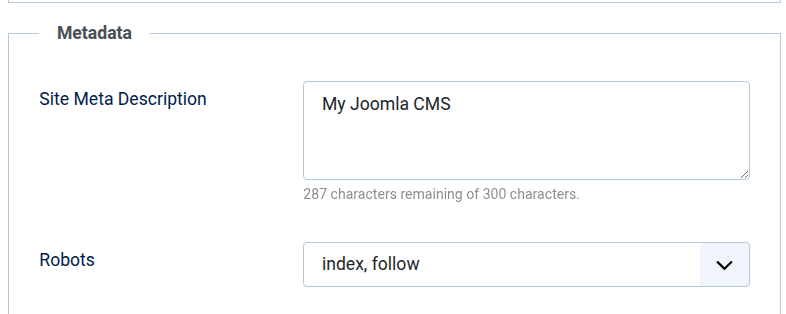
- Open the Site tab.
- Scroll to the Metadata section.
- Locate the Robots option.
For example, you can set this value to noindex, nofollow.
How OSMap Chooses Which Setting to Use
OSMap checks the settings in the following order:
- Article Robots setting
- Menu item Robots setting
- Joomla Global Configuration Robots setting
The first setting that contains a value is the one OSMap uses.
Conclusion
When deciding whether to include a URL in an XML sitemap, OSMap checks:
- The article's Robots setting.
- The menu item's Robots setting.
- The Joomla Global Configuration Robots setting.
Remember that these checks apply only to XML sitemaps. HTML sitemaps use different logic and may still display URLs that are excluded from the XML sitemap.