
Sometimes a Shack Forms Pro form may display correctly, but its fields can't be clicked or selected.
For example, clicking the Name, Email, or Message field may do nothing.
This doesn't necessarily mean that there is a problem with Shack Forms Pro. Another element on the page may be positioned over the form and intercepting mouse clicks.
In this guide, you will learn how to find such an element.
Step #1. Check for an element covering the form
You can use your browser's developer tools to check which element receives the click.
In Google Chrome:
- Open the page containing your Shack Forms Pro form.
- Right-click one of the fields and click Inspect.
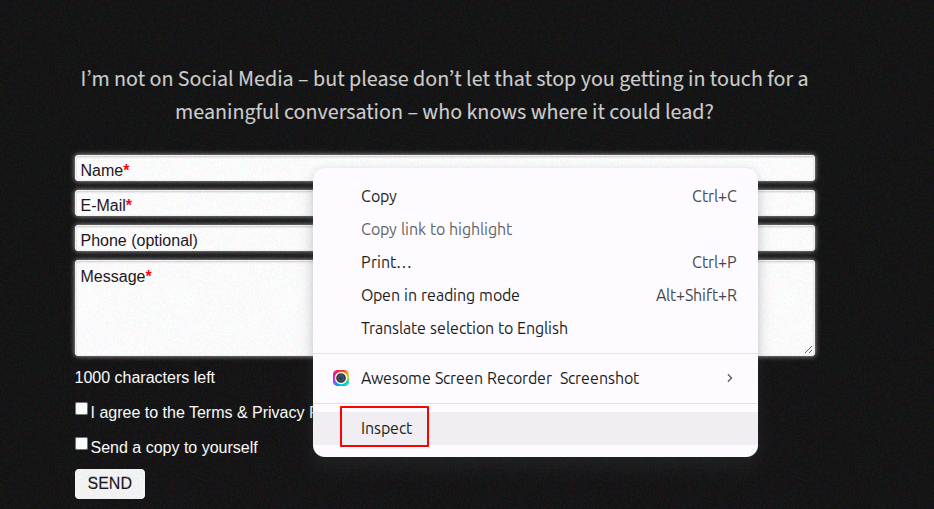
Chrome will highlight the HTML element that occupies that position on the page.
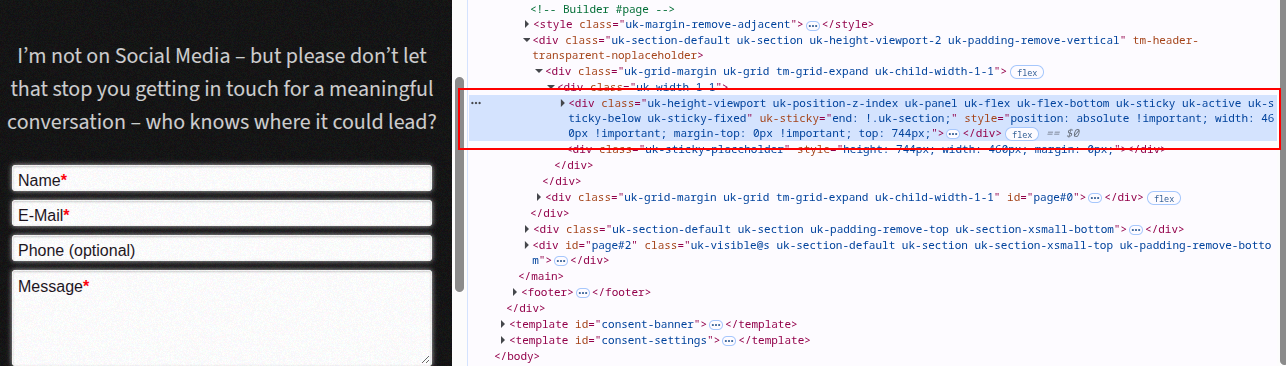
Normally, you would expect Chrome to select the Shack Forms Pro <input> or <textarea> field.
If Chrome selects a different element instead, that element may be covering the form.
Step #2. Temporarily remove the overlapping element
You can test this without making any changes to your website.
In the Elements panel:
- Make sure the suspected element is selected.
- Right-click it.
- Click Delete element.
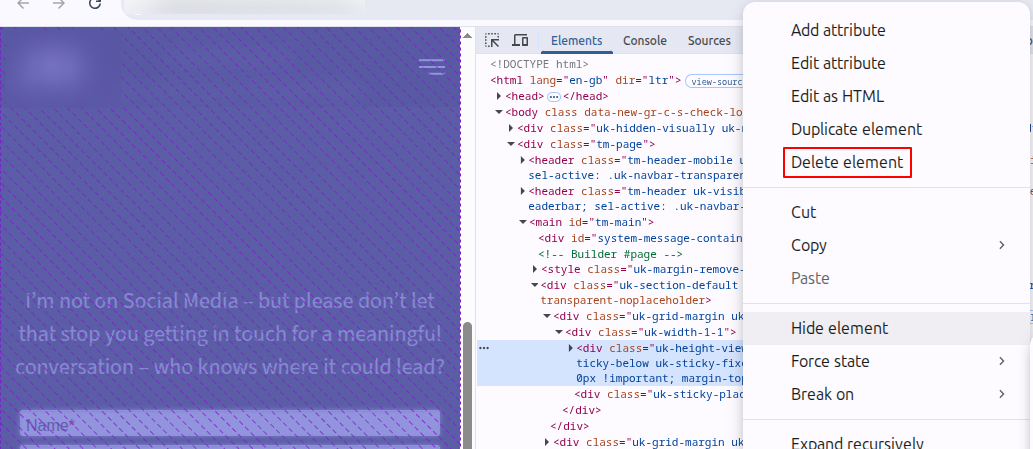
- Try clicking the Shack Forms Pro fields again.
This change exists only in your browser. Reloading the page will restore the deleted element.
If the form fields become clickable after removing the element, you have confirmed that another page element is covering the form.
Step #3. Check its CSS
Pay particular attention to CSS properties and classes related to positioning and stacking, such as position: absolute, position: fixed, position: sticky, and z-index.
An element can be transparent or otherwise invisible while still sitting above the form and receiving mouse clicks.
For example, UIkit-based templates may use classes such as uk-sticky, uk-sticky-fixed, and uk-position-z-index.

These classes aren't inherently a problem. However, incorrect positioning or layout settings can cause such an element to overlap your form.
What should I do if another element is covering the form?
If removing the overlapping element makes your Shack Forms Pro fields clickable again, the form itself is working.
Check the configuration and CSS of your Joomla template, page builder, or other extension responsible for the overlapping element.
If you're not sure how to correct it, send your template developer:
- The URL of the affected page.
- A screenshot showing the overlapping element in your browser's developer tools.
- The CSS classes of the element covering the form.
- Any JavaScript errors shown in the browser console.
This information should help them identify and fix the layout conflict.
Before contacting Joomlashack support
If your Shack Forms Pro fields are unclickable, please perform the test above first.
If Chrome selects the actual Shack Forms Pro field and you can't find another element covering it, please contact us. Send us the page URL and any errors shown in your browser console, and we'll be happy to investigate further.