

Building XML sitemaps should be simple.
If you run a large Joomla website, sitemap generation can sometimes hit the PHP memory limit. This is especially common on websites with lots of articles, menu items, categories, tags, or third-party extensions.
That’s why OSMap now includes a new Increase Memory setting.
In this blog post, you will learn what the Increase Memory setting does, where to find it, which value you should choose, and how it can help your Joomla website generate sitemaps more reliably.
Why Your Website May Need More Memory
Not every website needs extra PHP memory.
But some Joomla sites are simply heavier than others.
For example, your website may contain:
- thousands of articles
- large category structures
- many menu items
- lots of tags
- multiple third-party extensions
When OSMap scans all of this content, your server may hit PHP’s memory limit before the sitemap finishes generating.
That’s where the new setting can help you.
Where You Can Find the Setting
In your Joomla administrator area, go to Components > OSMap > Options:

Then open the Sitemap Settings tab.You’ll see the new Increase Memory dropdown setting there:
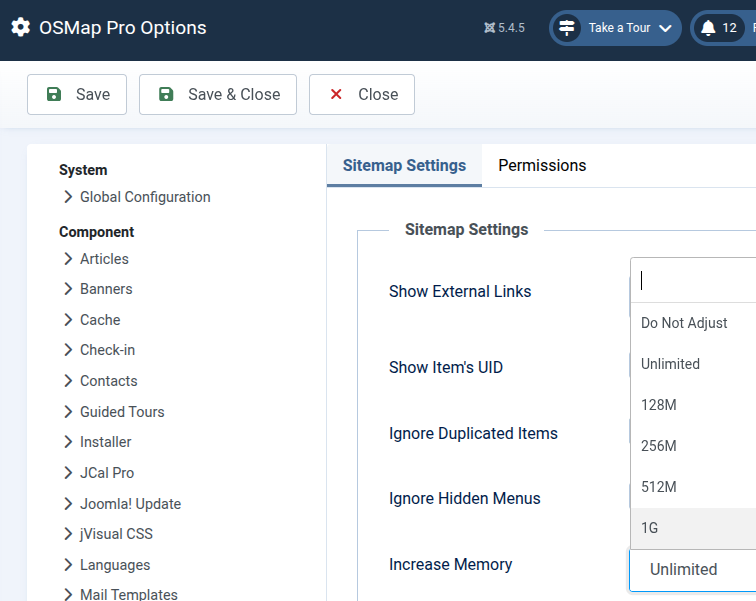
Available Memory Options
The new Increase Memory setting gives you several memory options to choose from:
- Do Not Adjust
- 128M
- 256M
- 512M
- 1G
- Unlimited
This gives you flexibility depending on your hosting environment and the size of your website.
What the Setting Actually Does
When OSMap starts generating a sitemap, it can temporarily raise PHP’s memory_limit value for that process.
For example, if your hosting account currently allows 128M of PHP memory and you select 256M inside OSMap, the extension will attempt to increase the available memory while your sitemap is generated.
This can help you avoid crashes or timeout issues on larger websites.
Recommended Settings
For most Joomla websites, these settings are a good starting point:
- Do Not Adjust — if your hosting already provides enough memory
- 256M — good for medium-to-large websites
- 512M — useful for very large sitemap builds
- 1G or Unlimited — usually only needed on advanced server setups
In many cases, 256M is more than enough for your site.
A Note About the “Unlimited” Option
The Unlimited setting changes PHP’s memory limit to -1.
This removes the memory cap entirely while your sitemap is generated.
While that may sound appealing, it’s usually best reserved for VPS or dedicated servers.
If you use shared hosting, choosing a fixed value like 256M or 512M is generally the safer approach.
Important Hosting Limitation
Some hosting providers do not allow PHP scripts to change the memory limit dynamically.
If that happens on your server, OSMap will continue using your hosting account’s existing PHP memory settings.
So even if you select a higher value inside OSMap, your hosting provider may still enforce its own limit.
Troubleshooting Sitemap Memory Errors
If you still see memory-related errors while generating your sitemap, try the following:
- Increase the setting to 256M
- Clear your Joomla cache
- Clear your browser cache
- Regenerate the sitemap
If the issue continues:
- try 512M
- check your hosting account’s PHP memory configuration
- contact your hosting provider if necessary
Final Thoughts
Most Joomla websites will never need this setting.
But if you run a larger or more complex site, the new Increase Memory option can make your sitemap generation much more reliable.
It’s a small setting, but it can save you from some very frustrating problems.
What's Next?
Save $1,000's when you sign up for Joomlashack's Everything Club.
You will get your hands on our extensive range of over 20 extensions, plus legendary support!