
The Joomlashack Blog
OSMap: Removing Links From a Joomla Sitemap
- Written by Steve Burge Steve Burge
- Published: 18 September 2026 18 September 2026
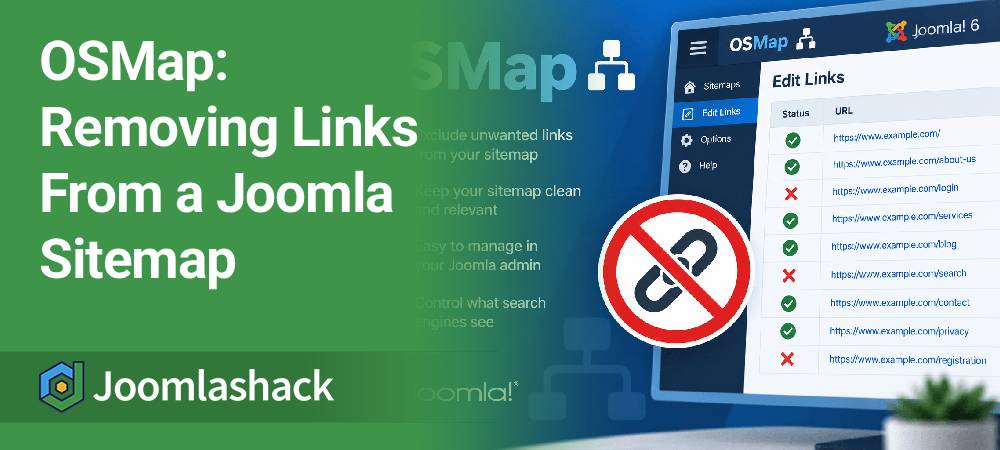
OSMap is the best and easiest way to create a Joomla sitemap.
When you install OSMap, it automatically creates a sitemap for you.
For more advanced users, it's possible to edit your sitemaps to include or exclude certain URLs. You may want to do this for visual purposes (you want a short and clean sitemap) or for SEO purposes (to exclude certain URLs from Google's index).
Or you might have login pages, utility pages, duplicate links, or other content that you don't want to include.
In this tutorial, we'll show you how to remove links from an OSMap sitemap.
How to Fix Broken Joomla User Groups
- Written by Steve Burge Steve Burge
- Published: 12 August 2026 12 August 2026

Joomla's user groups can be really powerful.
However, it's also possible to cause problems for yourself by making errors while setting up the user groups.
One Joomlashack member remained a super administrator and was able to log in to their site, but they lost the ability to see the administrator menu links and edit their site.
In this tutorial, we'll show you how to rescue yourself if your super administrator account no longer has the permissions it should.
How to Create a Google News Sitemap for Joomla Sites
- Written by Steve Burge Steve Burge
- Published: 13 July 2026 13 July 2026

Google News can be an excellent source of traffic for news websites.
To help Google discover your latest articles, you can submit a Google News sitemap. This is a specially formatted XML sitemap that includes news-specific tags and only lists articles published during the last two days.
A Google News sitemap does not guarantee that your articles will appear in Google News. Instead, it helps Google discover your latest news content more quickly.
In this guide, we'll show you how to create a Google News sitemap for your Joomla site using OSMap.
Read more: How to Create a Google News Sitemap for Joomla Sites
Joomla Legal File Types and Maximum Upload Size
- Written by Steve Burge Steve Burge
- Published: 03 July 2026 03 July 2026
By default, Joomla allows uploads only for specific file types and limits the maximum file size that can be uploaded.
For example, a standard Joomla installation allows the following file extensions:
bmp,csv,doc,gif,ico,jpg,jpeg,odg,odp,ods,odt,pdf,png,ppt,swf,txt,xcf,xls,BMP,CSV,DOC,GIF,ICO,JPG,JPEG,ODG,ODP,ODS,ODT,PDF,PNG,PPT,SWF,TXT,XCF,XLSHow to Change the Default Language in Joomla
- Written by Valentín García Valentín García
- Published: 01 July 2026 01 July 2026
When you install Joomla, you install the default English (UK) language for your website.
Joomla will use that language for both the frontend (public website) and the administrator (backend).
In this tutorial, you'll learn how to install another language pack and make it the default language for your Joomla site.
What Does Checked Out Mean in Joomla?
- Written by Steve Burge Steve Burge
- Published: 12 December 2025 12 December 2025
We had a question from a Joomlashack member. They wanted to know what "Checked out" means in Joomla, because they would see this message when trying to edit an article:
Check-out failed with the following error: The user checking out does not match the user who checked out the item. You are not permitted to use that link to directly access that page.
Why are these articles locked, and what does "Checked Out" mean? We'll answer that question in this blog post.
How to Use Content Versions in Joomla
- Written by Steve Burge Steve Burge
- Published: 05 December 2025 05 December 2025
Do you work with clumsy people?
Are you sometimes clumsy?
If you answered "Yes" to either question, then there is a Joomla feature that's perfect for you.
Versions is a security feature for your content. Versions let you keep a copy of your Joomla articles whenever you save a change.
How to Add a Home Icon to Joomla Menus
- Written by Valentín García Valentín García
- Published: 21 November 2025 21 November 2025
One of our members asked us this question:
"In some websites, the home menu is just an icon without any text. How can I do this in Joomla?"
The answer is surprisingly simple. Let me show you how to add a Home icon to your Joomla menu.
How to Add Modules to the Joomla Dashboard
- Written by Steve Burge Steve Burge
- Published: 24 October 2025 24 October 2025
It's possible to customize the Joomla dashboard panel for your users.
In particular, it can be useful to customize the dashboard panel area that users see when they first log in.
Here's how to modify the Joomla dashboard admin area to show the information that you or your client requires:
How to Manage PDFs and Other Documents with Joomla
- Written by Steve Burge Steve Burge
- Published: 17 October 2025 17 October 2025
When we get two people inside a few minutes in our support system asking how to do the same thing, it's time for a tutorial ...
This week, two Joomlashack members were asking how they can upload documents and link to them from articles. Our recommendation is an extension called OSDownloads.
Read more: How to Manage PDFs and Other Documents with Joomla